
LaTeX 多行公式排版指南
在 排版过程中,多行公式经常被遇到。其中,又分为多种情况
- 公式本身很长
- 公式组
- 需加定界符,如花括号
{
- 需加定界符,如花括号
首先,在导言区加载 amsmath
| |
常用多行公式环境对比
| 环境名称 | 主要用途 | 对齐支持 | 默认编号 | 备注 |
|---|---|---|---|---|
equation | 单行公式 | × | √ | 最基础,不可换行 |
multline | 超长公式折行 | × | √ | 首行左对齐,末行右对齐 |
align | 多行公式对齐 | √ (&) | √ | 最推荐,功能最全 |
gather | 多行公式堆叠 | × | √ | 仅居中堆叠,不对齐 |
cases | 分段函数 | √ (&) | √ (整体) | 需配合 numcases 实现逐行编号 |
长公式「被迫」折行
使用 multline 环境,实现首行局左,中间居中,末行局右
| |
注意: 若不需要编号则使用 multline*
公式并排
分别编号
- 需要对齐
使用 align 环境,在需要对齐的地方加 &
| |
式 (\ref{eq:eq1}) 和式 (\ref{eq:eq2}) 采用 align 对齐环境
- 使用
\notag对某行不编号
| |
注意: 因为此处在 + (二元运算符)处对齐,所以应该在对齐符号 & 前后使用一个占位符 {} 来避免不正确的缩进1
- 多列对齐
| |
- 不需要对齐
使用 gather 环境
| |
注意: 若不需要编号则使用 align* 或 gather*
统一编号
使用 aligned / gathered 环境,并且依赖 \begin{equation} \end{equation},若不须加编号则使用\[ \]包裹。
| |
带编号且对齐
不带编号不对齐
添加定界符
有时需要在多行公式中添加定界符,最常用的就是在公式左端加上花括号 {,下面介绍 3 种方法实现该功能。
实际上,除了 cases 环境,其他方法都可以实现其他定界符,尤其是最后一种。
\left\{ \right.aligned / gathered
1 2 3 4 5 6 7 8 9 10 11 12 13 14 15 16 17 18 19\begin{equation} \left\{ \begin{gathered} a_{11} x_{1} + a_{12} x_{2} + a_{13} x_{2} = b_{1} \\[3pt] a_{21} x_{1} + a_{22} x_{3} + a_{23} x_{3} = b_{2} \end{gathered} \right. \end{equation} \[ \left\{ \begin{aligned} a_{11} x_{1} + a_{12} x_{2} + a_{13} x_{2} = b_{1} \\[3pt] a_{22} x_{3} + a_{23} x_{3} = b_{2} \end{aligned} \right. \]不对齐带编号
\begin{equation} \left\{ \begin{gathered} a_{11} x_{1} + a_{12} x_{2} + a_{13} x_{2} = b_{1} \\[3pt] a_{21} x_{1} + a_{22} x_{3} + a_{23} x_{3} = b_{2} \end{gathered} \right. \end{equation}对齐不带编号\[ \left\{ \begin{aligned} a_{11} x_{1} + a_{12} x_{2} + a_{13} x_{2} = b_{1} \\[3pt] a_{22} x_{3} + a_{23} x_{3} = b_{2} \end{aligned} \right. \]array环境2
1 2 3 4 5 6 7 8\[ |x| = \left\{ \begin{array}{rl} -x & \mbox{if } x < 0,\\ 0 & \mbox{if } x = 0,\\ x & \mbox{if } x > 0. \end{array} \right. \]\[ |x| = \left\{ \begin{array}{rl} -x & \mbox{if } x < 0,\\ 0 & \mbox{if } x = 0,\\ x & \mbox{if } x > 0. \end{array} \right. \]cases环境3- 分别编号
需要在导言区载入cases宏包\usepackage{cases},并且放在amsmath之后
1 2 3 4 5 6 7 8 9 10 11 12 13\begin{numcases} {|x| =} -x & \mbox{if } x < 0 \label{eq:eq1},\\ 0 & \mbox{if } x = 0,\\ x & \mbox{if } x > 0. \end{numcases} \begin{subnumcases} {\label{eq:eq4} |x| =} -x & \mbox{if } x < 0,\\ 0 & \mbox{if } x = 0\label{eq:eq42},\\ x & \mbox{if } x > 0. \end{subnumcases} 式 (\ref{eq:eq1}) 和 式 (\ref{eq:eq4}) 和 式 (\ref{eq:eq42})- 统一编号
1 2 3 4 5 6 7\begin{equation} |x| = \begin{cases} -x & \mbox{if } x < 0,\\ 0 & \mbox{if } x = 0,\\ x & \mbox{if } x > 0. \end{cases} \end{equation}\begin{equation} |x| = \begin{cases} -x & \mbox{if } x < 0,\\ 0 & \mbox{if } x = 0,\\ x & \mbox{if } x > 0. \end{cases} \end{equation}注意与
array环境的区别- 分别编号
empheq环境

其与之前的都不同,它可以从整个公式(组)四周加载定界符5。从左端、从右端,甚至是用一个..盒子..包住整个公式(组)
首先在 导言区 载入 \usepackage{empheq}。使用它的框架是这样:
| |
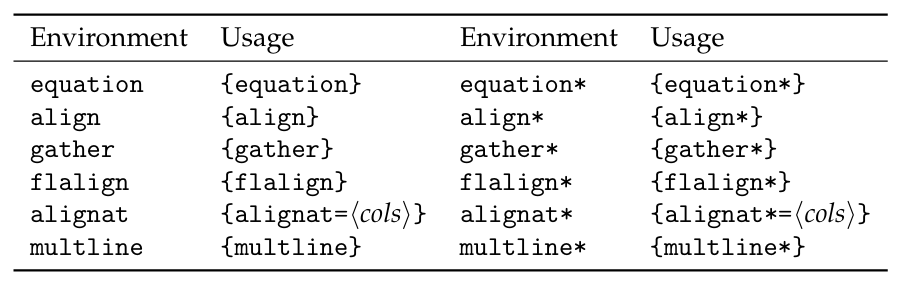
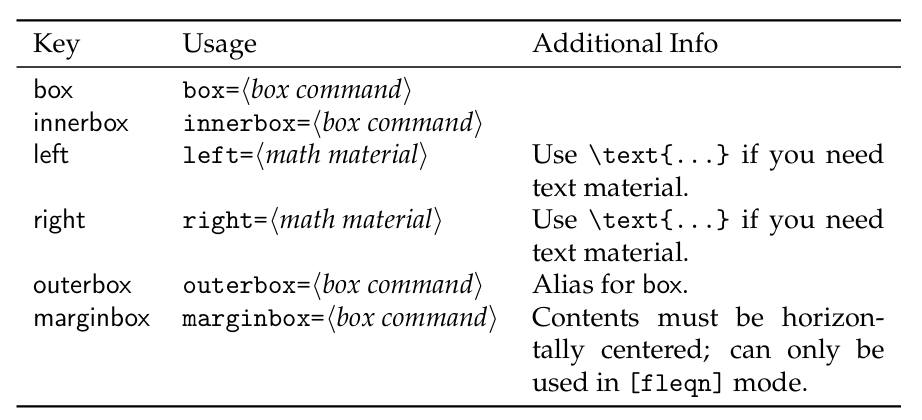
对于 定界符号,可以在 markup instructions 处填入下表中的命令
| |
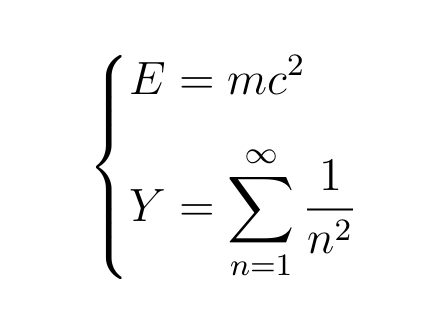
empheq 环境还可以实现以下效果,感兴趣的可以看下官方文档5
https://geelaw.blog/entries/la-composition-soignee-des-formules-mathematiques/#mistakes-latex-align-env ↩︎
array环境经常出现在多维数组中
https://mirror.bjtu.edu.cn/ctan/macros/latex/required/tools/array.pdf ↩︎cases环境 http://mirror.lzu.edu.cn/CTAN/macros/latex/contrib/cases/cases.pdf ↩︎因为博客渲染公式的 Mathjax 不支持
numcases环境,所以采用图片展现,也就造成前后问公式编号有些混乱 ↩︎a way to produce arbitrary delimiters that span entire math displays
http://mirror.lzu.edu.cn/CTAN/macros/latex/contrib/mathtools/empheq.pdf ↩︎ ↩︎